Viewing Recipes from the Meal Plan
When working with your meal plan, you can quickly access recipe details, scale servings, and print recipes without leaving the meal plan view.
Viewing a Recipe
From the meal plan page, click the View Recipe icon on any recipe card to see the full recipe details.
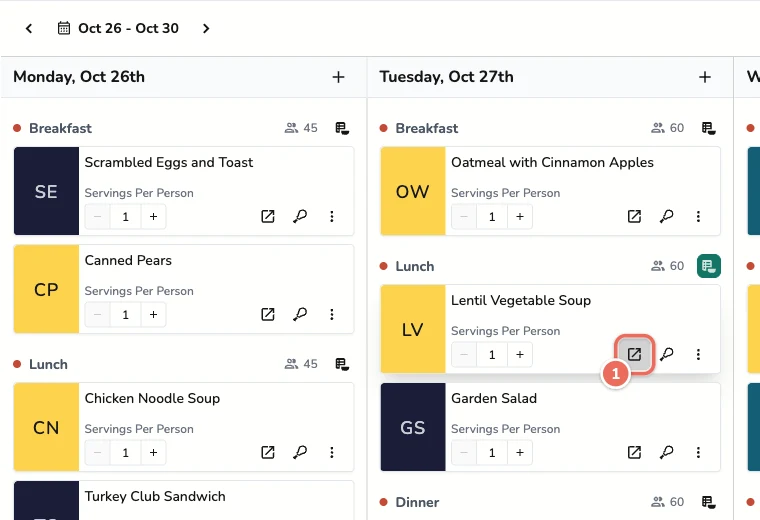
This opens the recipe view where you can see:
- Complete ingredient list with quantities
- Step-by-step cooking instructions
- Nutritional information (if enabled)
- Serving size information
Scaling Recipes
If you need to adjust the number of servings for a recipe, you can scale it directly from the recipe view:
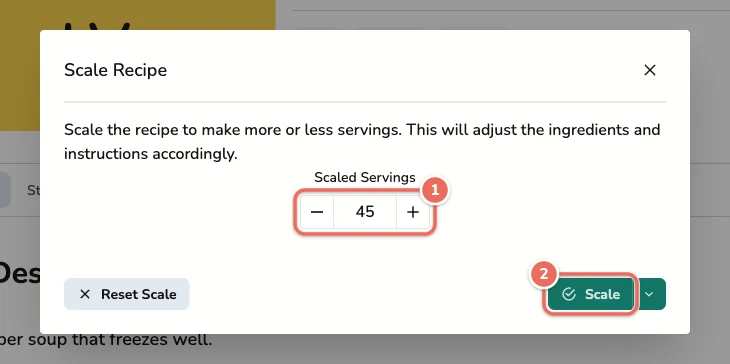
- Click the Scale button below the recipe tags
- Set Scaled Servings to the number you need
- Click Scale. Ingredient quantities update automatically
Click Reset Scale in the same dialog to go back to the original recipe.
The scaling feature is useful when:
- You have more or fewer people attending
- You want to make extras for leftovers
- You’re testing portion sizes
Printing Recipes
Click the More actions button (three dots) at the right of the recipe tabs, then select Print Recipe:
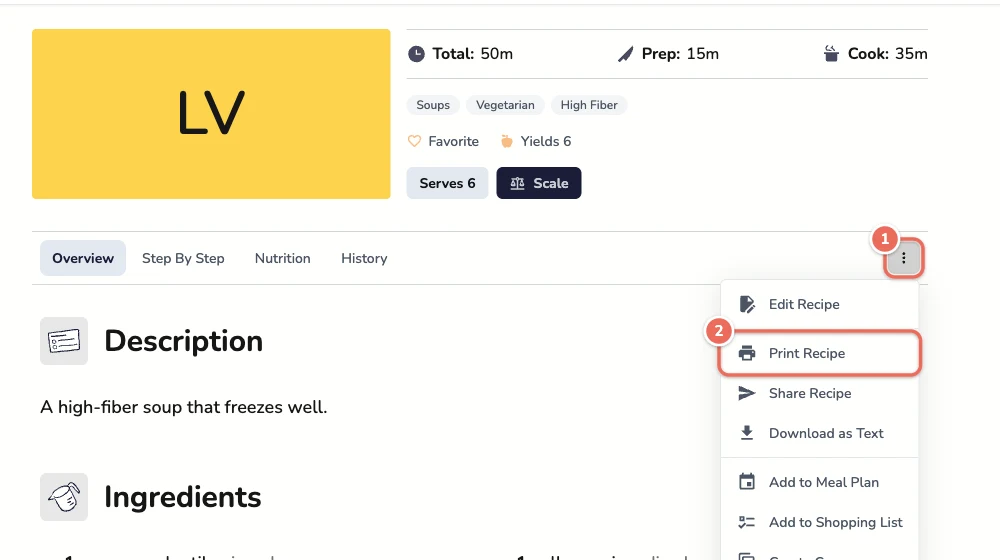
The printed recipe includes:
- Recipe name and description
- Scaled ingredient quantities
- Complete instructions
- Serving information
Related Articles
Last revised: